> For the complete documentation index, see [llms.txt](https://docs.jamaibase.com/llms.txt). Markdown versions of documentation pages are available by appending `.md` to page URLs; this page is available as [Markdown](https://docs.jamaibase.com/developer-reference/python-sdk-documentation/quick-start-action-table/action-table-image.md).
# Action Table - Image
Build a Smart Receipt Scanner with JamAI Base
## 1. Introduction
This tutorial will guide you through using the JamAI Base SDK to create a simple receipt information extraction system.
### What We'll Build
Snap a photo of your receipt and let AI do the expense report for you!
In this tutorial, we'll create a receipt processing system that:
1. Takes a receipt image as input
2. Uploads it to JamAI Base action table
3. Extracts key information like:
* Shop name
* Total amount
### Prerequisites
Before starting, you'll need:
* Python 3.11 or higher installed
* Project ID and Personal Access Token (PAT)
## 2. Installation and Setup
### Installing the SDK
```bash
pip install jamaibase
```
### Basic Configuration
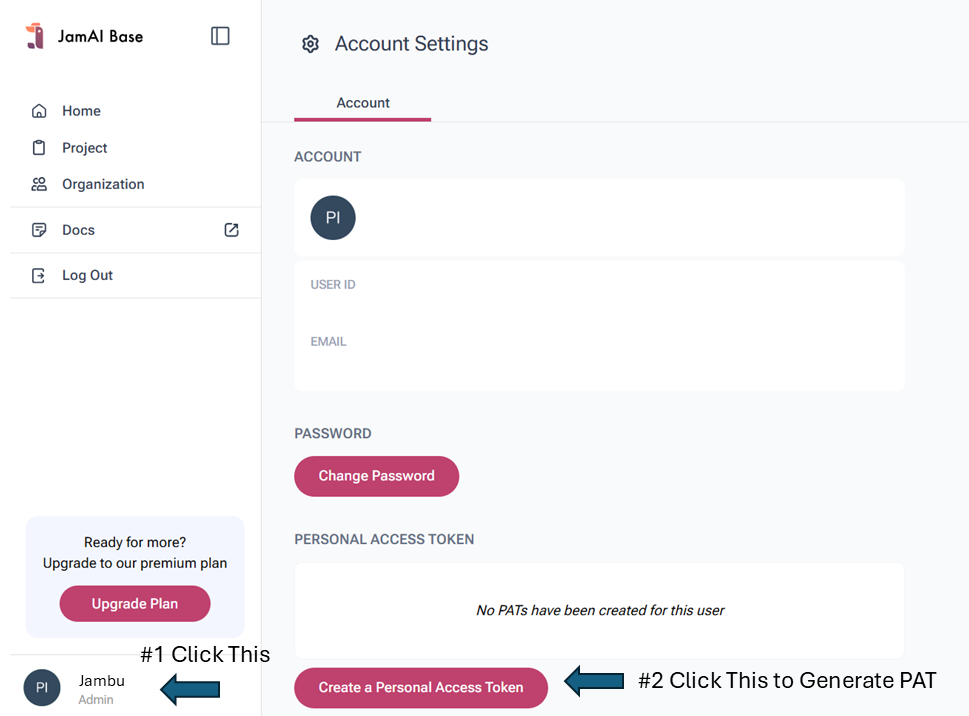
Get your Personal Access Token (PAT) here:
How to generate PAT
Get your Project ID here:
How to get Project ID
```python
from jamaibase import JamAI, types as t
PROJECT_ID = "your_project_id"
PAT = "your_PAT"
client = JamAI(
project_id=PROJECT_ID,
token=PAT
)
```
## 3. Creating Your Action Table
For simplicity, you can set up your action table in the JamAI Base platform:
1. Navigate to your JamAI Base action table tab
2. Create a new action table named `"receipt"`
3. Configure the following columns:
```
Input Column:
- Name: "Image"
- Type: FILE
Output Columns:
- Name: "Shop Name"
Type: str
☑️ Output checkbox enabled
- Name: "Total"
Type: str
☑️ Output checkbox enabled
```
Create new action table
Created table
## 4. Basic Implementation
### 4.1 Simple Receipt Processor
```python
def process_single_receipt(image_path):
# Upload image file
file_response = client.file.upload_file(image_path)
# Process in action table
response = client.table.add_table_rows(
table_type=t.TableType.ACTION,
request=t.RowAddRequest(
table_id="receipt",
data=[{"Image": file_response.uri}],
stream=False,
),
)
# Extract results
return {
"shop_name": response.rows[0].columns["Shop Name"].text,
"total": response.rows[0].columns["Total"].text
}
```
### 4.2 Complete Implementation with Error Handling
```python
import os
from typing import Dict, Optional
class ReceiptProcessor:
def __init__(self, project_id: str, pat: str):
self.client = JamAI(
project_id=project_id,
token=pat
)
def validate_image(self, image_path: str) -> bool:
"""Validate if file exists and has correct extension"""
if not os.path.exists(image_path):
raise FileNotFoundError(f"Image not found: {image_path}")
valid_extensions = ['.jpg', '.jpeg', '.png', '.webp', '.gif']
file_ext = os.path.splitext(image_path)[1].lower()
if file_ext not in valid_extensions:
raise ValueError(f"Unsupported file format. Use: {valid_extensions}")
return True
def process_receipt(self, image_path: str) -> Optional[Dict[str, str]]:
"""Process a single receipt image"""
try:
# Validate image
self.validate_image(image_path)
# Upload file
print("Uploading image...")
file_response = self.client.file.upload_file(image_path)
print(f"Upload successful: {file_response.uri}")
# Process in action table
print("Processing receipt...")
response = self.client.table.add_table_rows(
table_type=t.TableType.ACTION,
request=t.RowAddRequest(
table_id="receipt",
data=[{"Image": file_response.uri}],
stream=False,
),
)
# Extract and return results
results = {
"shop_name": response.rows[0].columns["Shop Name"].text,
"total": response.rows[0].columns["Total"].text
}
print("Processing complete!")
return results
except Exception as e:
print(f"Error processing receipt: {str(e)}")
return None
```
## 5. Usage Examples
### 5.1 Basic Usage
```python
# Initialize processor
processor = ReceiptProcessor(PROJECT_ID, PAT)
# Process single receipt
result = processor.process_receipt("path/to/receipt.jpg")
if result:
print(f"Shop Name: {result['shop_name']}")
print(f"Total: {result['total']}")
```
### 5.2 Batch Processing
```python
def process_receipt_batch(receipt_folder: str):
processor = ReceiptProcessor(PROJECT_ID, PAT)
results = []
for filename in os.listdir(receipt_folder):
if filename.lower().endswith(('.jpg', '.jpeg', '.png', '.webp', '.gif')):
image_path = os.path.join(receipt_folder, filename)
result = processor.process_receipt(image_path)
if result:
results.append({
"filename": filename,
**result
})
return results
# Usage
results = process_receipt_batch("path/to/receipt/folder")
for result in results:
print(f"File: {result['filename']}")
print(f"Shop: {result['shop_name']}")
print(f"Total: {result['total']}")
print("---")
```
## 6. Best Practices
1. **Error Handling**
* Always validate input files
* Handle network errors gracefully
2. **Performance**
* Reuse the client instance
* Consider batch processing for multiple files
* Implement rate limiting for large batches
3. **Security**
* Use environment variables for credentials
## Complete Standalone Example
Save this as `receipt_processor.py`:
```python
import os
import argparse
from jamaibase import JamAI, types as t
from typing import Dict, Optional
class ReceiptProcessor:
def __init__(self, project_id: str, pat: str):
self.client = JamAI(
project_id=project_id,
token=pat
)
def validate_image(self, image_path: str) -> bool:
if not os.path.exists(image_path):
raise FileNotFoundError(f"Image not found: {image_path}")
valid_extensions = ['.jpg', '.jpeg', '.png']
file_ext = os.path.splitext(image_path)[1].lower()
if file_ext not in valid_extensions:
raise ValueError(f"Unsupported file format. Use: {valid_extensions}")
return True
def process_receipt(self, image_path: str) -> Optional[Dict[str, str]]:
try:
self.validate_image(image_path)
print(f"Processing receipt: {image_path}")
print("Uploading image...")
file_response = self.client.file.upload_file(image_path)
print(f"Upload successful!")
print("Extracting information...")
response = self.client.add_table_rows(
table_type=t.TableType.ACTION,
request=t.RowAddRequest(
table_id="receipt",
data=[{"Image": file_response.uri}],
stream=False,
),
)
results = {
"shop_name": response.rows[0].columns["Shop Name"].text,
"total": response.rows[0].columns["Total"].text
}
return results
except Exception as e:
print(f"Error: {str(e)}")
return None
def process_folder(folder_path: str, processor: ReceiptProcessor) -> None:
"""Process all receipts in a folder"""
if not os.path.exists(folder_path):
print(f"Folder not found: {folder_path}")
return
results = []
for filename in os.listdir(folder_path):
if filename.lower().endswith(('.jpg', '.jpeg', '.png')):
image_path = os.path.join(folder_path, filename)
result = processor.process_receipt(image_path)
if result:
results.append({
"filename": filename,
**result
})
# Print results in a formatted way
print("\nProcessing Results:")
print("-" * 50)
for result in results:
print(f"File: {result['filename']}")
print(f"Shop Name: {result['shop_name']}")
print(f"Total: {result['total']}")
print("-" * 50)
def main():
# Set up argument parser
parser = argparse.ArgumentParser(description='Process receipt images using JamAIBase')
parser.add_argument('--project-id', required=True, help='Your JamAIBase project ID')
parser.add_argument('--pat', required=True, help='Your Personal Access Token')
parser.add_argument('--input', required=True, help='Path to image file or folder')
args = parser.parse_args()
# Initialize processor
processor = ReceiptProcessor(args.project_id, args.pat)
# Process input
if os.path.isfile(args.input):
# Single file processing
result = processor.process_receipt(args.input)
if result:
print("\nResults:")
print("-" * 50)
print(f"Shop Name: {result['shop_name']}")
print(f"Total: {result['total']}")
print("-" * 50)
else:
# Folder processing
process_folder(args.input, processor)
if __name__ == "__main__":
main()
```
### How to Run
1. Save the code above as `receipt_processor.py`
2. Install required package:
```bash
pip install jamaibase
```
3. Run for a single receipt:
```bash
python receipt_processor.py --project-id "your_project_id" --pat "your_pat" --input "path/to/receipt.jpg"
```
4. Run for a folder of receipts:
```bash
python receipt_processor.py --project-id "your_project_id" --pat "your_pat" --input "path/to/receipt/folder"
```
### Example Output
```
Processing receipt: 20240920_033000.jpg
Uploading image...
Upload successful!
Extracting information...
Results:
--------------------------------------------------
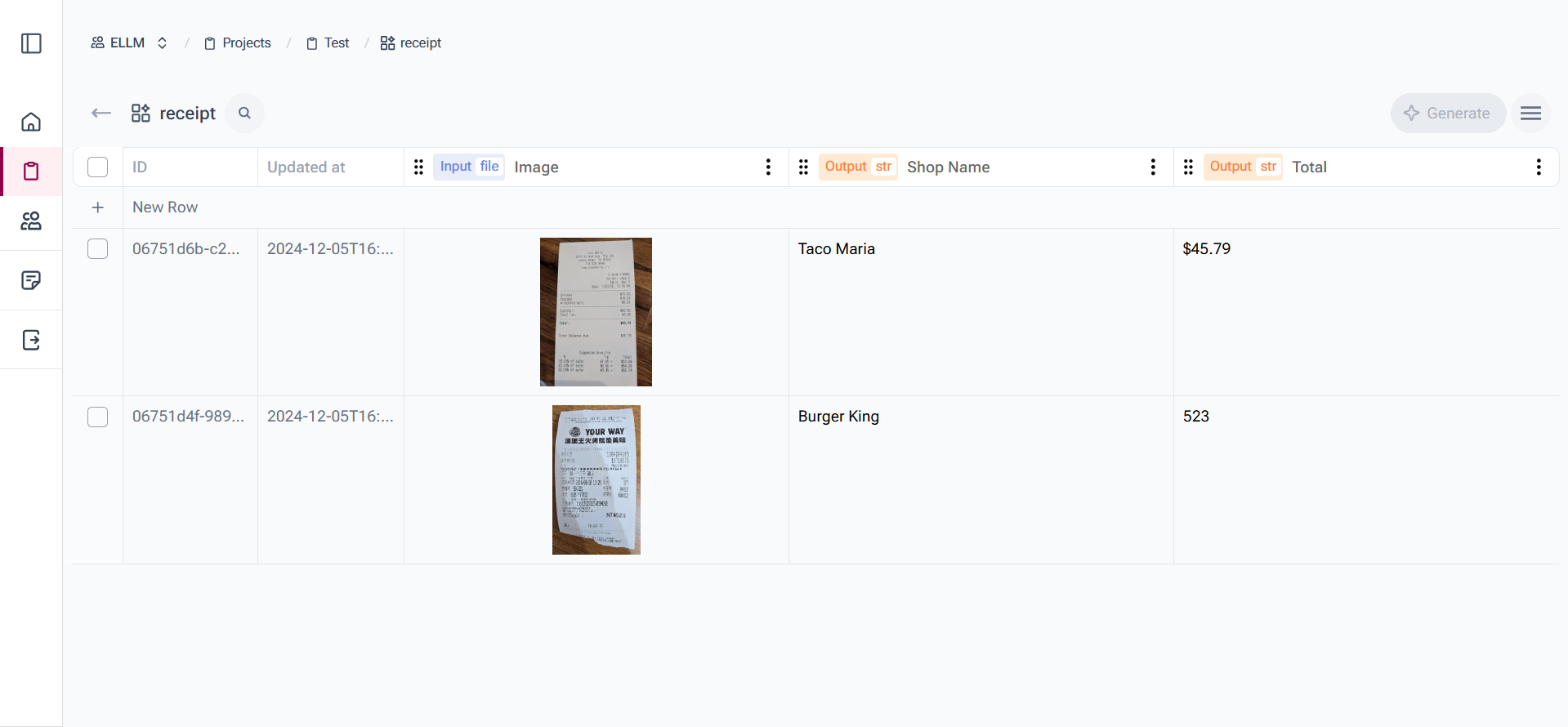
Shop Name: Burger King
Total: 523
--------------------------------------------------
```
The receipt table with the uploaded image.
### Features
* Processes single images or entire folders
* Validates file types and existence
* Provides clear progress feedback
* Formats results in an easy-to-read way
* Includes error handling
* Command-line argument support
This standalone example provides a complete, working implementation that you can use as a starting point for your own projects or modify according to your needs.
---
# Agent Instructions
This documentation is published with GitBook. GitBook is the documentation platform designed so that both humans and AI agents can read, navigate, and reason over technical content effectively. Learn more at gitbook.com.
## Querying This Documentation
If you need additional information that is not directly available in this page, you can query the documentation by asking a question.
Perform an HTTP GET request on the following URL with the `ask` and `goal` query parameters:
```
GET https://docs.jamaibase.com/developer-reference/python-sdk-documentation/quick-start-action-table/action-table-image.md?ask=&goal=
```
`ask` is the immediate question: it should be specific, self-contained, and written in natural language.
`goal` is what the user is ultimately trying to achieve, the reason they need the answer. Sharing it helps GitBook give you a better, more relevant answer. A goal is most helpful when it describes the outcome the user wants rather than restating the question. For example, with `ask=how do I create an API token`, a goal like `automate deployments from our CI pipeline` lets GitBook tailor the answer to that use case.
The response will contain a direct answer to the question and relevant excerpts and sources from the documentation.
Use this mechanism when the answer is not explicitly present in the current page, you need clarification or additional context, or you want to retrieve related documentation sections.