> For the complete documentation index, see [llms.txt](https://docs.jamaibase.com/llms.txt). Markdown versions of documentation pages are available by appending `.md` to page URLs; this page is available as [Markdown](https://docs.jamaibase.com/developer-reference/python-sdk-documentation/quick-start-with-chat-table.md).
# Quick Start with Chat Table
Build Intelligent Conversational Applications in Minutes with JamAI Base Chat Tables
## 1. Introduction
This guide will help you quickly get started with JamAI Base chat tables using the Python SDK. You'll learn how to create a simple chat application similar to the example provided.
## 2. Prerequisites
* Python 3.11 or above
* JamAI Base account
* Personal Access Token (PAT)
* Project ID
## 3. Installation
```bash
pip install jamaibase
```
## 4. Basic Setup
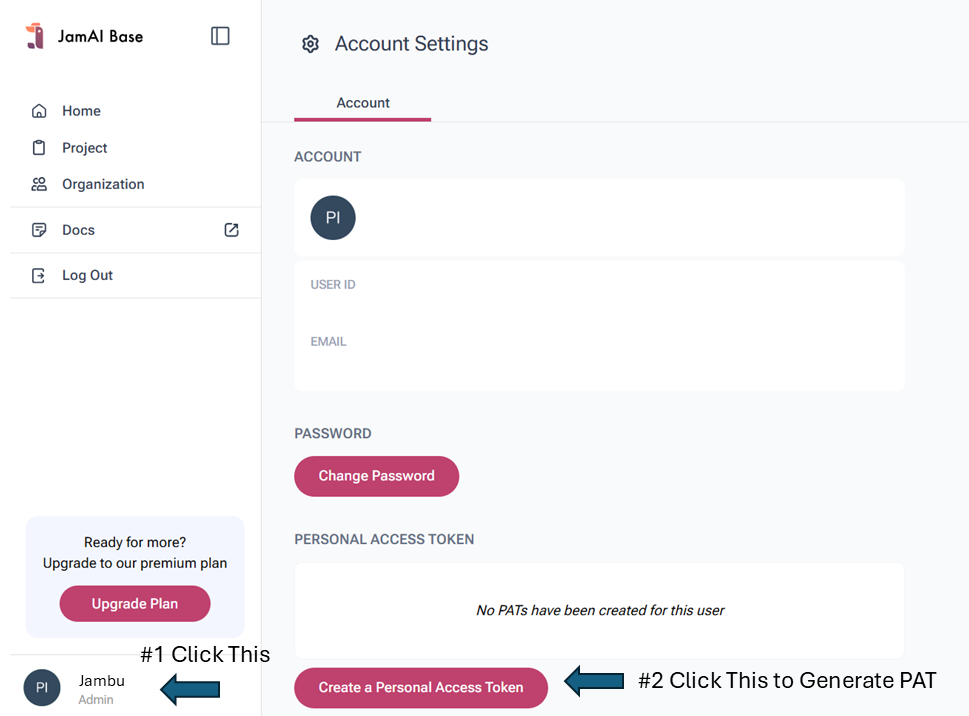
Get your Personal Access Token (PAT) here:
How to generate PAT
Get your Project ID here:
How to get Project ID
```python
from jamaibase import JamAI, types as t
import os
# Initialize JamAI client
jamai = JamAI(
project_id="your_project_id", # Replace with your project ID
token="your_pat_token" # Replace with your PAT
)
```
## 5. Creating a Chat Agent (UI First)
Go to JamAI Base web interface chat table tab
Navigate to "Agents" section, click **`+`** to create new agent.
Name the new agent `"example_agent"`and select LLM model.
You can further configure your agent in UI but it will not be covered in this tutorial.
Example of some configuration you can do:
* Set system prompt
* Set multiple parallel agent
* Configure RAG settings
* Set up knowledge base
## 6. Creating Chat Sessions
Each chat session is created by duplicating your base agent table. Here's how to do it:
```python
def create_new_chat():
timestamp = int(time.time())
new_table_id = f"Chat_{timestamp}"
try:
jamai.table.duplicate_table(
table_type=t.TableType.CHAT,
table_id_src="example_agent", # Your base agent ID
table_id_dst=new_table_id,
include_data=True,
create_as_child=True
)
return new_table_id
except Exception as e:
print(f"Error creating new chat: {str(e)}")
return None
```
## 7. Basic Chat Interaction
```python
# Send a message and get response
def chat_interaction(table_id, user_message):
response = jamai.table.add_table_rows(
table_type=t.TableType.CHAT,
request=p.RowAddRequest(
table_id=table_id,
data=[{"User": user_message}],
stream=True # Set to False for non-streaming response
)
)
# For streaming response
full_response = ""
for chunk in response:
if chunk.output_column_name == 'AI':
full_response += chunk.content
return full_response
```
## 8. Simple Implementation Example
```python
# Create a new chat session
chat_id = create_new_chat()
if chat_id:
# Send a message
response = chat_interaction(chat_id, "Hello, how are you?")
print("AI:", response)
```
## 9. Key Features
* **Streaming Responses**: Use `stream=True` for real-time responses
* **Session Management**: Each chat creates a new table instance
* **Inheritance**: New chats inherit settings from the base agent
* **History Preservation**: Chat history is maintained in the table
## 10. Best Practices
* Create a new chat session for each conversation
* Handle exceptions during table creation
* Store chat IDs for session management
* Clean up unused chat tables periodically
## 11. Complete Runnable Example
Here's a complete, standalone example that you can copy, paste, and run:
```python
import streamlit as st
from jamaibase import JamAI, types as t
import time
import os
from dotenv import load_dotenv
# Load environment variables (optional)
load_dotenv()
# Constants
PROJECT_ID = "your_project_id" # Replace with your project ID
PAT = "your_pat_token" # Replace with your PAT
TABLE_TYPE = t.TableType.CHAT
OPENER = "Hello! How can I help you today?"
# Initialize JamAI
jamai = JamAI(project_id=PROJECT_ID, token=PAT)
def create_new_chat():
timestamp = int(time.time())
new_table_id = f"Chat_{timestamp}"
try:
jamai.table.duplicate_table(
table_type=TABLE_TYPE,
table_id_src="example_agent", # Replace with your agent ID
table_id_dst=new_table_id,
include_data=True,
create_as_child=True
)
return new_table_id
except Exception as e:
st.error(f"Error creating new chat: {str(e)}")
return None
def main():
st.title("Simple Chat Demo")
# Initialize session state
if "table_id" not in st.session_state:
new_table_id = create_new_chat()
st.session_state.table_id = new_table_id
st.session_state.messages = [{"role": "assistant", "content": OPENER}]
# Create New Chat button
if st.button("New Chat"):
new_table_id = create_new_chat()
if new_table_id:
st.session_state.table_id = new_table_id
st.session_state.messages = [{"role": "assistant", "content": OPENER}]
st.rerun()
# Display chat messages
for message in st.session_state.messages:
with st.chat_message(message["role"]):
st.write(message["content"])
# Chat input
if prompt := st.chat_input("Type your message here"):
# Display user message
with st.chat_message("user"):
st.write(prompt)
st.session_state.messages.append({"role": "user", "content": prompt})
# Get AI response
with st.chat_message("assistant"):
message_placeholder = st.empty()
full_response = ""
# Stream the response
for chunk in jamai.table.add_table_rows(
table_type=TABLE_TYPE,
request=t.MultiRowAddRequest(
table_id=st.session_state.table_id,
data=[{"User": prompt}],
stream=True
)
):
if chunk.output_column_name == 'AI':
full_response += chunk.content
message_placeholder.write(full_response + "▌")
message_placeholder.write(full_response)
st.session_state.messages.append({"role": "assistant", "content": full_response})
if __name__ == "__main__":
main()
```
### How to Run:
1. Save the code in a file (e.g., `chat_demo.py`)
2. Install required packages:
```bash
pip install streamlit jamaibase python-dotenv
```
3. Replace the following values:
* `your_project_id` with your actual Project ID
* `your_pat_token` with your Personal Access Token
* `example_agent` with your agent ID created in the UI
4. Run the application:
```bash
streamlit run chat_demo.py
```
This example provides:
* A simple chat interface
* Streaming responses
* New chat session creation
* Basic error handling
Note: Make sure you have created your agent in the JamAI Base UI before running this code, as it relies on duplicating an existing agent table.
This example serves as a great starting point for building more complex chat applications with JamAI Base.
---
# Agent Instructions
This documentation is published with GitBook. GitBook is the documentation platform designed so that both humans and AI agents can read, navigate, and reason over technical content effectively. Learn more at gitbook.com.
## Querying This Documentation
If you need additional information that is not directly available in this page, you can query the documentation by asking a question.
Perform an HTTP GET request on the following URL with the `ask` and `goal` query parameters:
```
GET https://docs.jamaibase.com/developer-reference/python-sdk-documentation/quick-start-with-chat-table.md?ask=&goal=
```
`ask` is the immediate question: it should be specific, self-contained, and written in natural language.
`goal` is what the user is ultimately trying to achieve, the reason they need the answer. Sharing it helps GitBook give you a better, more relevant answer. A goal is most helpful when it describes the outcome the user wants rather than restating the question. For example, with `ask=how do I create an API token`, a goal like `automate deployments from our CI pipeline` lets GitBook tailor the answer to that use case.
The response will contain a direct answer to the question and relevant excerpts and sources from the documentation.
Use this mechanism when the answer is not explicitly present in the current page, you need clarification or additional context, or you want to retrieve related documentation sections.